| Date tip published: | 04/24/2006 |
| Description: | This tip covers the different certifications available to a Notes Domino 7 Application Developer and the best ways to prepare for the exams. It also covers how to get certified in Notes Domino 7 if you have an existing Lotus certification for an older version. |
To learn more about about getting certified use the following links:
JavaScript in Notes Domino 7
Notes Domino 7 Certified Developer Package
Notes Domino 7 LotusScript Package
 Notes Domino 7 Developer Certification Paths Notes Domino 7 Developer Certification Paths
This article will concentrate on the Notes Domino 7 certifications for developers. In a future article we will cover the administrator certifications.
Why get certified? Certification is a great way to show a level of competency. Certification is a great addition to your resume. Depending on the level of certification, getting certified requires passing one or a series of multiple-choice exams. You take these exams at a Pearson VUE or Prometric testing center. These testing centers are available world-wide in larger cities.
There are three levels of certification for Notes and Domino 7 for both administrators and developers. The entry level certification is the Associate level. The intermediate level of certification is the IBM Certified Professional. For the Lotus certifications this level is called "Certified Application Developer" or "Certified System Administrator". The Advanced level is typically called the Advanced or Enterprise level. The exact name used will vary by product. Below are the three levels of certification showing the typical certification titles used for each level.
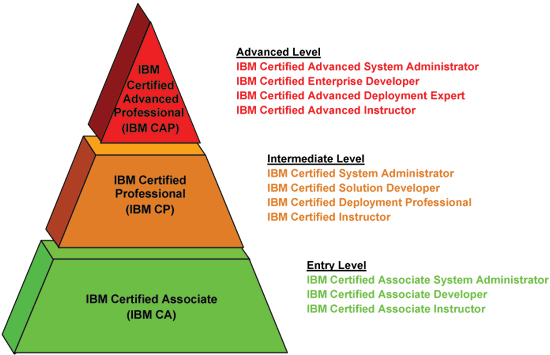
Currently IBM has the following developer certifications available for Notes Domino 7:
IBM Lotus Notes Domino 7
- IBM Certified Associate Developer - Lotus Notes and Domino 7
- IBM Certified Application Developer - Lotus Notes and Domino 7
- IBM Certified Advanced Application Developer - Lotus Notes and Domino 7
The requirements for each level will vary based on the product and the actual certification. The entry level (Associate) certification requires one exam and the Application Developer level requires two additional exams. The Advanced Certification level requires passing one of three advanced exams.
 Preparing for the Exams Preparing for the Exams
The best way to prepare for the exams is to obtain the product and learn how to use it. It may be possible to just read a book on Domino and pass the exam but the easiest way to ace the exams is to learn how to actually use Notes and Domino. If you have no experience at all with Notes and Domino get the Domino Designer client and learn how to develop applications. Develop some applications for use around the house to catalog your collection of CD's or a website on your favorite hobby. There is much that can be done without a Domino server. TLCC has courses to help you learn Notes Domino application development. There are also redbooks by IBM and many other books available. Finally, when it comes time to take the exam several vendors offer practice exams to help you test yourself before taking the actual examination. TLCC has been partnering with CertFX, one of the practice exam vendors, and has received good feedback from our students on the CertFX products.
Taking the Exams
The exams are available through two testing vendors, Pearson VUE and Prometric (formerly known as Sylvan.) The cost ranges from $75 to $175. Most exams are $150. Below are the links for each test vendor:
IBM Certified Associate Developer - Lotus Notes and Domino 7
This certification requires only one exam and is a good way to get started on the Domino certification path. The required exam is:
- Exam 710 - Notes Domino 7 Application Development Foundation Skills
The exam focuses on application development foundation skills as it relates to design elements like forms and views, application architecture, security, database management, and programming. The programming languages such as LotusScript, Java, or JavaScript are not covered. The exam objectives (from the IBM/Lotus website) are listed below. The cost for this exam is $125 at Prometric.
 Click here to see the 710 exam objectives
Application Architecture Click here to see the 710 exam objectives
Application Architecture
- Creating, Modifying, Troubleshooting for Notes Clients
- Domino Application Architecture
- Executing requests from the Notes Client
- Using images in applications
- Using links to make application elements available to users
- Using tables to manage page layout
- Using the Designer Bookmarks to organize projects
- What is a replica database
- Working with local applications
Database Management
- Controlling what gets replicated
- Copy a Database
- Create a blank database
- Create a database from a template
- Create & Modify Groups in the Domino Directory
- Creating a Design Template
- Creating database help documents
- Creating database icon
- Monitor/Maintain Replication
- Preventing Design inheritance
- Printing from the designer
- Setting Database Properties
- Setting up Design inheritance
- Setting up Document Locking
- Troubleshooting Database Access
- Using Design Synopsis to analyze application elements
- Using Design Templates to Refresh an application design
- What is a Notes database
Design Elements
- Creating field help and hints
- Creating shared image resources
- Creating sorted and categorized views
- Creating, Modifying & Troubleshooting Embedded Elements: Navigator
- Creating, Modifying & Troubleshooting Embedded Elements: Views
- Creating, Modifying, Troubleshooting Actions
- Creating, Modifying, Troubleshooting Agents
- Creating, Modifying, Troubleshooting Columns
- Creating, Modifying, Troubleshooting Fields
- Creating, Modifying, Troubleshooting Folders
- Creating, Modifying, Troubleshooting for Dual Clients
- Creating, Modifying, Troubleshooting Forms
- Creating, Modifying, Troubleshooting Hotspots
- Creating, Modifying, Troubleshooting Layers
- Creating, Modifying, Troubleshooting Links
- Creating, Modifying, Troubleshooting Navigators
- Creating, Modifying, Troubleshooting Pages
- Creating, Modifying, Troubleshooting Sections
- Creating, Modifying, Troubleshooting Views
- Displaying document hierarchy in views
- Displaying icons in columns
- Displaying numbers in columns
- Hiding Agents
- Scheduled Agents
- Setting Agent Properties
- Working with Autosave
- Working with Data Types: Color
- Working with Data Types: Formula
- Working with Data Types: Keywords
- Working with Data Types: Names
- Working with Data Types: Number
- Working with Data Types: Password
- Working with Data Types: Rich Text Lite
- Working with Data Types: Rich Text
- Working with Data Types: Text
- Working with Data Types: Time Zone
- Working with Data Types: Time/Date
- Working with Shared Resources
Programming
- Create field validation and translation formulas
- Creating formulas with @Commands
- Creating formulas with @Functions
- Creating Right-Click Action menus
- Display or hide information on forms using hide/when options
- Domino Designer application and design environment
- Make preferred tools readily available to the IDE
- Programming window titles
- Set default field values
- Setting programmer pane properties
- Using Designer Reference Panel
- Using Programmer's Pane Auto-Complete
- Using the Designer objects pane
- Working with Basic Formula Language
Security
- Adding security to an application
- Defining security levels for application users
- Determine Databases Group Access
- Secure applications: Authors fields
- Secure applications: Readers fields
- Set Database Access: Default Access
- Setting and Reading ACLs
IBM Certified Application Developer - Lotus Notes and Domino 7
Once you pass the 710 exam and become an Associate Developer, then passing two more exams will earn you the Certified Application Developer title. The required exams are:
- Exam 711 - Notes Domino 7 Application Development Intermediate Skills
- Exam 712 - Notes Domino 7: Development Web Applications
Information about each exam is shown below:
Exam 711 - Notes Domino 7 Application Development Intermediate Skills
The exam focuses on more advanced application development skills using Lotus Notes 7 as it relates to various design elements, application architecture, security, database management, and programming. This exam also covers how to develop workflow applications using Domino. The programming languages such as LotusScript, Java, or JavaScript are not covered (at least not in detail.) The cost for this exam is also $125 at Prometric.
Click here to see the 711 exam objectives
Application Architecture
- Creating Navigation
- Defining connections to external data sources
- Designing applications based on Summary/Non-Summary data storage
- Designing applications incorporating OLE objects
- Incorporating full text indexing
- Planning a Notes Application
- Preventing replication or save conflicts
- Setting styles for a calendar view
- Setting styles for a standard view or folder
- Working with reserved fields
Database Management
- Creating context sensitive database help
- Managing data and design replication
- Managing design changes with the Design task
- Managing design locking
- Managing display options for views
- Managing document locking
- Managing multiple design elements
- Securing database design
- Server document settings affecting agents
- Setting Database launch properties
- Setting Database Properties to improve database performance
- Signing databases and design elements
- Troubleshooting database performance
- View and transaction logging
Design Elements
- Creating and enabling a Data Connection resources
- Creating, Modifying, Troubleshooting Forms
- Creating, Modifying, Troubleshooting Views
- Creating, Modifying and Troubleshooting Columns
- Creating, Modifying, Troubleshooting Framesets
- Creating, modifying, troubleshooting Pages
- Creating, Modifying, Troubleshooting Layers
- Creating, Modifying, Troubleshooting Outlines
- Creating, Modifying, Troubleshooting Profile Documents
- Creating, Modifying and Troubleshooting Subforms
- Creating, modifying, troubleshooting Embedded Elements
- Customizing twisties
- Sharing, locking, and editing design elements
- Setting Agent Properties
- Using Calendar views in applications
- Working with Shared Resources
Programming
- Allowing users to edit or create documents from a view
- Customizing the Designer Tools menu
- Creating programmable tables
- Enabling and using agent profiling
- Programming with the formula language
- Referencing design elements IDs: UNID & NOTEID
- Using electronic signatures in Notes applications
- Using Advanced options for columns
- Using formula language in programmable design elements
- Using hidden columns to sort view data
- Using iterative statements in formula language
- Working with dialog boxes: Layout regions, tables, and forms
- Working with hide-when formulas
Security
- Managing field access with input enablement formulas
- Managing replication with ACLs
- Managing security with Roles
- Restrict Form Access
- Restrict Section Access
- Restrict View Access
- Setting and troubleshooting agent security
- Setting workstation level Security (ECL)
- Setting database ACL advanced properties
- Troubleshooting Effective Access
- Understanding Database encryption
- Using Document encryption
- Using Field-level encryption
- Using Mail encryption
- Using Reader and Author Fields
Workflow
- Creating mail-enabled forms
- Creating mail-in databases
- Troubleshooting workflow routing issues
Exam 712 - Notes Domino 7 Developing Web Applications
The exam focuses on how to develop Domino applications for use by web browser clients. The cost for this exam is also $125 at Prometric.
Click here to see the 712 exam objectives
Application Architecture
- Creating Web Site Rule documents
- Defining global Web site settings using the Administrator client
- Designing applications that work on Web clients
- Designing Web applications that read non-Domino data
- Exploring page layout and navigation
- Planning applications that work in both Notes and Web clients
- Setting database properties for Web access
- Setting up Web site rules
- Understanding server tasks for Web browsing
- Understanding the types of global Web site settings you can define on the server
- Using server documents to manage Internet access to the server
Design Elements
- Controlling document target frames
- Creating, Troubleshooting, Modifying Framesets
- Creating, Troubleshooting, Modifying Outlines for Web clients
- Creating, Troubleshooting, Modifying Pages for Web clients
- Creating, Modifying and Troubleshooting images for Web clients
- Creating, Modifying and Troubleshooting Java Libraries
- Creating, Modifying, Troubleshooting JavaScript for Notes & Web clients
- Creating, Modifying and Troubleshooting images for Web clients
- Creating, Modifying and Troubleshooting Java Libraries
- Creating, Modifying and Troubleshooting JavaScript Libraries
- Creating, Modifying, Troubleshooting Links for Web clients
- Creating, Modifying and Troubleshooting LotusScript Libraries
- Creating, Modifying and Troubleshooting Style Sheets
- Creating, Troubleshooting, Modifying File Resources
- Creating, Troubleshooting, Modifying Views for Web clients
- Creating, Modifying, Troubleshooting Web Agents
- Creating, Modifying, Troubleshooting Web Services
- Creating Public access forms
- Deploying, utilizing LotusScript for Web clients
- Employing Java Applets
- Implementing Java Servlets
- Personalizing Web site experience using Profile Documents
- Understanding Web Services
- Using JavaScript events in applications
Programming
- Adding horizontal rules to forms & pages
- Creating HTML fields on pages using computed text
- Deploying a simple Java applet on a Web page
- Deploying, utilizing LotusScript agents
- Making preferred tools readily available to the IDE
- Modifying simple JavaScript
- Passing data from a Web form to a Web agent
- Personalizing Web site experience using cookies
- Rendering DHTML in applications
- Rendering HTML in applications
- Testing JavaScript
- Using Domino URL Syntax
- Understanding the Domino tag libraries for JavaServer pages
- Understanding the JavaScript Document Object Model (DOM)
- Understanding an HTML page and its format
- Understanding XSLT
- Understanding URL commands for servers and databases
- Using @Commands in Web applications
- Using @Functions in Web applications
- Using CGI variables
- Using CSS for adding style
- Using the HTML Editor
- Using HTML for Notes and Web access
- Using HTML in Views
- Using HTML Tables
- Using JavaScript in applications
- Using XML in applications
- Using JavaScript to access field contents
- Using JavaScript to create a redirect page
- Validating user entered data using JavaScript
- Working with Common JavaScript
- Working with Cookies in your applications
- Working with DXL Tools
- Working with HTML attributes on fields
- Working with $$Return fields
- Writing formulas to support different clients
Security
- Controlling CGI Directory access
- Determining Secure Sockets Layer security
- Planning application security based on Web authentication
- Planning Single Sign-on
- Setting Database Access: Controlling Web Authentication
- Setting Database Access: Using Anonymous Access
- Setting Database Access: Using Maximum Internet name and password
- Setting Database Access: Using Roles
- Setting Field Access: Using Encryption
- Understanding security differences between Web access vs. Notes client access
IBM Certified Advanced Application Developer - Lotus Notes and Domino 7
Once you pass the 710, 711 and 712 exams and become an IBM Certified Application Developer, then passing one more exam will earn you the IBM Certified Advanced Application Developer title. You have a choice of exams to take (pass just one of the following):
- Exam 273 - LotusScript in Notes for Advanced Developers
- Exam 513 - Using JavaScript in Notes Domino Applications
- Web Services (to be available later in 2006)
Information about the first two exams is listed below. Note that LotusScript and JavaScript exams are the same as those required for the Notes Domino 6 Advanced certification. The Java exam no longer counts towards Advanced Certification for Notes/Domino 7.
Exam 273 - LotusScript in Notes for Advanced Developers
This exam concentrates on the LotusScript language and the Domino Object Model. The cost for this exam is also $125 at Prometric.
Click here to see the 273 exam objectives
Database Level Competencies
- Establish connectivity within the database
- Establish connectivity between Notes databases
- Establish connectivity among Notes/non-Notes databases
- Access session information
- Access DbDirectory information
- Create a database
- Delete a database
- Create a new replica database
- Access a database
- Set up ODBC connectivity
- Document Level Competencies
- Establish relationships among documents
- Make response documents
- Create a document using methods and items
- Show a created view using the refresh method on NotesView
- Delete a document
- Create/delete items
- Create/delete rich text itemsAccess documents through collections
- Search for all documents in a database
- Search for all documents in a view
- Process a collection
- Full Text Search a collection
- Count a collection
- View documents through the User Interface
- Access all documents in a database
- Load the LSX module
- Create agents
- Create newsletters
Programming Concept Competencies
- Control Field events
- Control Form events
- Control Button events
- Make use of scope
- Solve problems using Looping (Iterating)
- Solve problems using Logic (Program flow)
- Solve problems using Options (alternation/branching)
- Solve problems using Functions/subroutines (branching)
- Solve problems using Array processing
- Solve problems using Option base
- Solve problems using Declaration/initialization
- Build error checking routines
- Debug programming problems
User Interface Competencies
- Access documents using UIWorkspace
- Access documents using UIDocument
- Log to a Log file
Production/Architecture Issues
- Plan and architect problem solutions
- Decide script programming design and implementation issues such as:
- When to use/not use script
- when to use form events versus field actions
- when to use view columns versus fields
- when to use interactive versus batch
- when to use the front end/back end for. . .
- getting data from databases
- setting document contents
- When to use in memory versus on disk structures
- When to use gets versus loops
- Enable server agents through script
- solve security issues through script
- Decide script scope & source issues
- Mark documents processed through script
Exam 513 - Using JavaScript in Notes Domino Applications
This exam concentrates on the JavaScript language and how to use JavaScript in Domino web applications. The cost for this exam is also $125 at Prometric.
 Are you already certified as a Notes Domino 6 Application Developer? Are you already certified as a Notes Domino 6 Application Developer?
If you are already certified as a Notes Domino 6 Application Developer than you can take one exam listed to get re-certified as a Notes Domino 7 Application Developer. If you were already an Advanced Application Developer and took the JavaScript or LotusScript exam to reach that level, then you will also be an Advanced Developer at the Notes Domino 7 level too.
Exam 701 - IBM Lotus Notes Domino 7 Application Development Update
This exam concentrates on the changes and new features in Notes Domino 7 like web services. The cost for this exam is also $125 at Prometric.
Click here to see the 701 exam objectives
Design and Development Enhancements
- Identify and use new features and options in the Domino Designer interface
- Describe AutoSave architecture
- Implement AutoSave in a form
- Recover AutoSaved documents
- Create a shared column
- Identify impact of modifying a shared column
- Identify impact of deleting a shared column
- Enable agent and Web service profiling
- View results of agent and Web service profiling
- Interpret results of agent and Web service profiling
- Manage the Notes client and Domino Designer exit prompt
- Understand impact of disabling the exit prompt on both the Notes client and Domino Designer
- Close multiple open windows in Notes client and Domino Designer
- Utilize new accessibility features in Notes tables
- Create actions for right-click menuing
- Create Input Enabled formulas
- Recognize that views can now have multiple user-defined color columns
Programming Enhancements
- Recognize new @Functions
- Recognize new @Commands
- Recognize @Functions which are no longer officially supported
- Recognize new LotusScript methods
- Recognize new LotusScript properties
- Utilize LotusScript debugger enhancements
- Debug Java code remotely using a third-party Integrated Development Environment
Web Services in Domino Applications
- Define basic Web services concepts and terminology
- Create a Web service using LotusScript
- Describe how WSDL is generated and maintained
- Recognize that SOAP binding is required for Domino Web services
- Apply security on a Domino Web service
If you are a R5 or earlier CLP than there is no "fast track" to Notes Domino 7 certification and you will have to start over with the 710, 711, and 712 exams. |
Links for More Information
TLCC Notes Domino 7 Exam Suggestions - This page lists the various TLCC courses suggested for each Notes Domino 7 certification exams
Lotus Certification Page - This is the home page for getting information on Lotus certifications.
Lotus Exam Guides - This page has links to the different exams guides from Lotus. These contain the exam objectives (which were repeated in this article.)
|